Windows · 100% local

Compress any video to an exact size

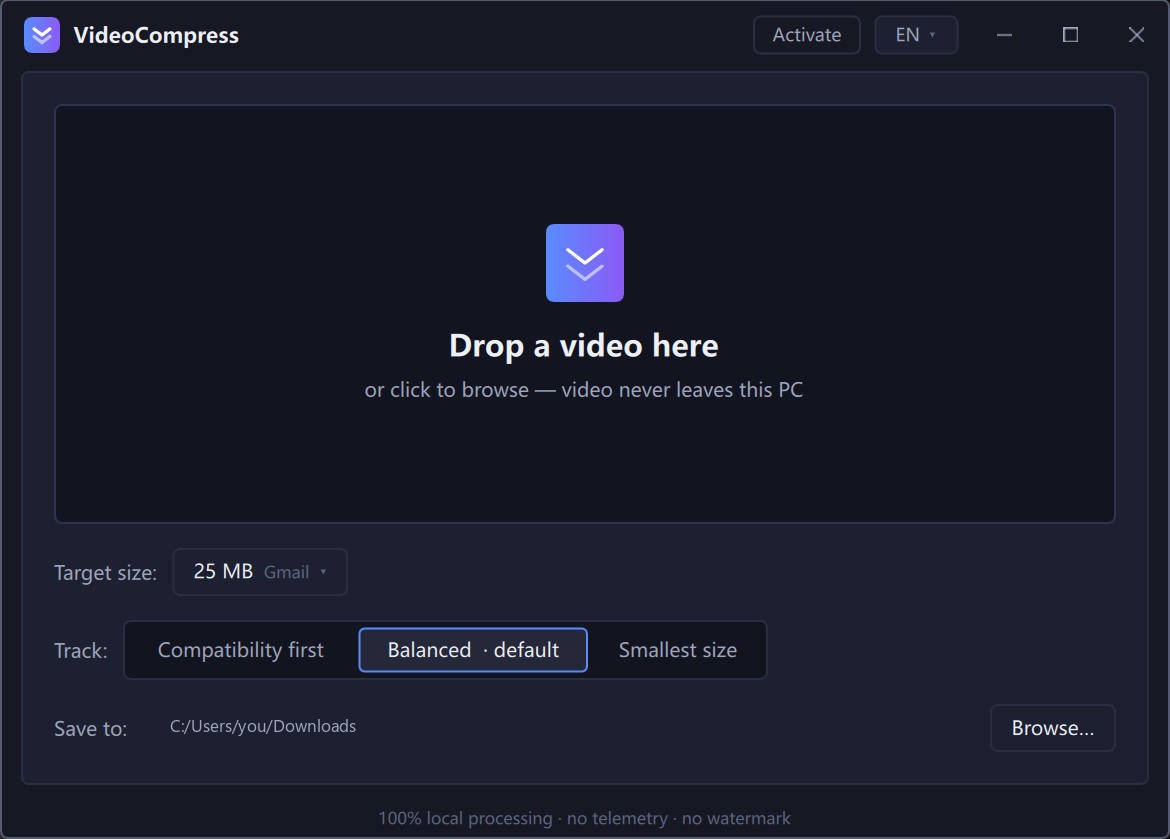
Pick a target — 25 MB for email, 10 MB for Discord — and VideoCompress hits it with 2-pass encoding. Your video never leaves this PC.

✓ Free tier — videos up to 5 minutes, no sign-up. Windows 10/11 · 64-bit

VideoCompress app — drop a video, pick a 25 MB target, compress locally

Hit the size limits that matter

Every platform caps what you can send. VideoCompress lands under the line — on the first try.

10 MB
Discord — free plan upload
per Discord support docs
25 MB
Gmail — attachment limit
per Google Workspace docs
16 MB
WhatsApp — media share
per WhatsApp help center

Three steps. No settings rabbit hole.

VideoCompress does one job: hit the size you pick. It plans bitrate, encodes in 2 passes, and refines if the first result misses the target.

1

Pick a target size

25 MB for email, 10 MB for Discord, or any custom value. Presets included.

2

Drop your video

MP4, MOV, MKV, WebM, AVI and more. Everything stays on this machine.

3

Done — size hit

Instant-play MP4 output, quality auto-matched to your video. Preview the result side by side.

Built for the size you asked for

Online converters guess. VideoCompress measures — with professional 2-pass encoding and automatic refinement.

CORE

Exact size, not "around it"

Two-pass encoding measures your video first, then spends the bits. If the result drifts from your target, it re-encodes to correct — within ±2% on typical content.

PRIVACY

Nothing is uploaded

Compression runs entirely on this PC with FFmpeg. No queue, no file size cap from a server, no one watching your footage. Off-plane? It still works.

Three quality tracks

Compatibility (H.264), Balanced (GPU-accelerated when available), and Minimal size (AV1). Auto-tuned to your hardware — NVIDIA, AMD and Intel encoders detected at startup.

Honest free tier

The free version compresses full-quality videos up to 5 minutes — the same engine buyers get. Unlock unlimited length for $14.9 once. No subscription.

Online converters vs. VideoCompress

"Free online" tools upload your footage to someone else's server. Here's the honest comparison.

Online convertersVideoCompress
Your video leaves the PCYes — uploaded to their serverNever — 100% local
Hit an exact target sizeEstimate only, often misses2-pass + auto refinement
File size capServer limits (often 100-500 MB)None — your disk is the limit
Queue waitsYes, shared serversNo — your machine, full speed
Works offlineNoYes
Watermarks / adsCommonNone, ever

Simple pricing

Try it free. Buy once, use forever — including all 1.x updates.

Free

$0
  • Full compression engine
  • Videos up to 5 minutes
  • All quality tracks & presets
  • Comparison preview
Download free
LIFETIME

Pro

$14.9 one-time
  • Unlimited video length
  • Everything in Free
  • Use on 3 of your PCs
  • All 1.x updates included
  • Email support
Buy once — $14.9

Frequently asked questions

Everything people ask before hitting Download.

How can it hit an exact size when other tools can't?

Two-pass encoding: the first pass analyzes your video and builds a rate plan, the second spends exactly that budget. If the output still drifts from your target, VideoCompress automatically re-encodes with a corrected plan — up to two refinements.

Is my video uploaded anywhere?

No. All processing happens on your PC using the bundled FFmpeg engine. The app works with no internet connection at all — the network is only used for optional license activation.

Which formats are supported?

Input: MP4, MOV, MKV, WebM, AVI, TS and more — including 4K, 10-bit and vertical phone videos. Output is instant-play MP4 (H.264, H.265 or AV1 video + AAC audio).

Does it use my GPU?

Yes, when available. VideoCompress detects NVIDIA (NVENC), AMD (AMF) and Intel (QSV) encoders at startup and routes to the best one. Without a GPU it falls back to a high-quality software encoder automatically.

Windows shows a SmartScreen warning when I run the installer. Is it safe?

The app isn't code-signed yet (a paid certificate is planned). Click "More info" → "Run anyway". The installer and app are identical to what you download from this site — you can verify by re-downloading and comparing.

What does the free version include?

The full engine with no watermarks, for videos up to 5 minutes. One video at a time. The $14.9 Pro license lifts the duration limit and is a one-time payment — not a subscription.

Is there a Mac version?

Windows 10/11 (64-bit) is the current focus. macOS is on the roadmap.
Stop re-encoding by hand.

Pick the size. Drop the video. Get the file. Free for videos up to 5 minutes.

Installer = recommended: start-menu shortcut, clean uninstall. Portable = single folder, no admin rights needed.
Windows 10/11 · 64-bit · v0.1.0 · both builds are identical inside